

Salesforce is a dynamic cloud-based CRM with a steep learning curve and a lot of power. But it’s tough to implement, operate, and maintain.
An integration with HubSpot brings sleek simplicity and seamless harmony to your workflow — without forcing you to move off of your Salesforce CRM. With the helpful insights of a HubSpot integration partner, your platform double-whammy can even supercharge sales.
Your team may have been using Salesforce for years. Stop us if this sounds familiar:
- Salesforce can do almost anything, even if it’s difficult to figure out or implement.
- There’s a mountain of historical data you need to preserve.
- You’ve got significant resources invested in training up your team to use Salesforce.
- It’s already cost you tens of thousands of dollars to build out extensive Salesforce custom reporting, pipelines, properties, and more.
At this point, does it really make sense to blow up your process and start over in a new system? We get it. But no matter how entrenched your business is in the Salesforce ecosystem, it’s likely that you’re still investing in pricy technical consulting services or have needed to hire one or more full-time, highly-trained Salesforce admins to keep everything operational.
Some users compare Salesforce to the proverbial “800-pound gorilla.” It’s got the pedigree and power to command top dollar as a leading sales tool with thousands of integrations and loyal users worldwide. However, Salesforce was also built over time, through acquisitions — which means the user experience, functionality, and connections can vary by the specific products you’re using. There’s a steep learning curve with an entire orchestra of complex-to-implement bells and whistles. So many, in fact, that most small businesses soon discover they’ll never end up using most of them.
HubSpot Brings Harmony to Marketing and Sales
Ease of use is the most common reason companies undergo a HubSpot-Salesforce integration. The clean, polished, and intuitive interface of HubSpot makes it user-friendly and perfect for bridging the gap between marketing and sales with a seamless integration. There’s a reason it’s consistently ranked as the most user-friendly CRM and B2B software.
A HubSpot integration gives you a functional interface where your team can learn the ins and outs much more quickly and feel far more comfortable and in control — without sacrificing any of your long-term Salesforce investment or losing important historical data.
How will HubSpot do it? Well:
- Easy to Get Started: You can get a basic Salesforce-HubSpot integration set up quickly, with no advanced technical knowledge. Businesses have the option to call up HubSpot for a straightforward, phone-based setup process that takes minutes. Note: This is a separate process from the initial setup of your powerful, nuanced, branded HubSpot portal.
- No Interruptions: You can keep using Salesforce as normal, without interruptions in service before, during, or after integrating with HubSpot. There’s no need to blow up all of your existing tools or stop the sales team from chugging along as usual.
- Seamless Alignment With Marketing: The smooth bi-directional integration will feed all of your Salesforce data back and forth with HubSpot while giving both the marketing and sales teams valuable insight into what’s going on with the other side of the business. Every contact you update in one software will be reflected in the other.
- Sales Reps Love HubSpot: The cohesive HubSpot platform gives your business the perfect balance of analytics superpower and user-friendly functionality. We often hear that sales reps are impressed with HubSpot’s ease of use and engaging interface, as well as how cleanly it loops back into their portal. Some sales teams will keep a Salesforce instance open on screen, but the reps actually find that they’re functioning more often on the HubSpot Sales side of things because it’s faster and easier to use.
Sales rep adoption in particular is among the best benefits of integration with HubSpot. Many businesses that integrate Salesforce and HubSpot see an instant improvement in their data quality. When you team up Salesforce historical data with HubSpot’s robust reporting, convenient automation, and straightforward UX, your sales team and admins are empowered with much clearer visibility into the health of your business.

Why Integrate HubSpot with Salesforce?
Completing a HubSpot integration with Salesforce is about combining the power of two industry-leading platforms to enhance your:
- Customer records
- Email marketing opportunities
- Campaign marketing plans
- Sales enablement tools
- Inbound marketing tactics
- Channel marketing opportunities
And, perhaps the best reason, when the integration has been completed, you will have the opportunity to create a better experience for customers on their sales journey.
It’s true that any one of those outcomes can be accomplished through a non-integrated system. But to do so is complex, time-consuming, unreliable, and takes hours of human intervention. And there is the concern that unforced human errors will occur. With HubSpot and Salesforce working in sync, you have the opportunity to remove these potential barriers and create a more efficient and effective sales and marketing process.
The actual integration process is not a time-intensive or complicated one. After you have completed the upfront work, you will just need to give the two platforms permission to talk to each other. And then you’ll be off and running.
Key Benefits of HubSpot and Salesforce Integration
The integration of these two powerhouse platforms creates for your company a more efficient sales and marketing tool with new data and metric packets and a streamlined customer journey through the sales process. The benefits your teams will experience from this integration will be felt almost instantaneously.
Some of the benefits that you will receive from a HubSpot to Salesforce integration include:
- Collecting customer and lead records in a centralized space
- Improved lead scoring processes
- Personalized customer outreach programs
- Stronger collaboration opportunities for sales and marketing teams
- Better insight into a prospect's sales journey, including more accurate tracking
- Cohesive integration between customer services, sales, and marketing teams
- More accurate reporting
- Faster time to close
There are also several intangible benefits that you will discover as teams get more comfortable using the new processes that are an outcome of this integration. For example, because the integration makes the processes performed by sales and marketing more efficient, each team will have more time to focus on new initiatives.
How to Use Your HubSpot-Salesforce Integration Partner
The powerful bi-directional sync between HubSpot and Salesforce is valuable on its own, but never so much as with the added insights of a HubSpot-certified integration partner. Your HubSpot-Salesforce integration will give you all the tools you need for in-depth intelligence and reporting beyond what you can easily accomplish with Salesforce alone. A HubSpot integration partner helps you get there.
Use your partner’s expertise to your advantage and ramp up your sales intelligence through customized HubSpot configurations and automations like these:
- Monitor Prospect Behavior: Have your partner deploy the HubSpot tracking code across pages on your WordPress, Shopify, Drupal, Magento, Wix, or other website to enable sophisticated data collection and reporting on lead behavior. Sales intelligence on the CTAs that earn the most clicks, most popular asset downloads, form conversion rates, high-converting messaging, and more can be fed into Salesforce contact records to inform and enhance your sales process and conversations with your prospects.
- Set Up Revisit Notifications: Deploy automated alerts that notify sales reps when existing Salesforce contacts visit your site for a second time.
- Sync Marketing & Sales Activities:
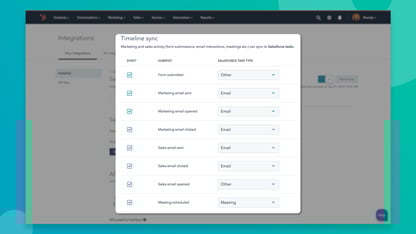
Get everyone on the same page by linking marketing and sales activities in HubSpot with your Salesforce tasks. All new tasks created in Salesforce will appear on the matching object record in HubSpot, and vice versa. This gives you a complete picture of lead interactions, and you can even report on the activities on one platform from the other. - Nurture Leads Based on Sales Cycle:
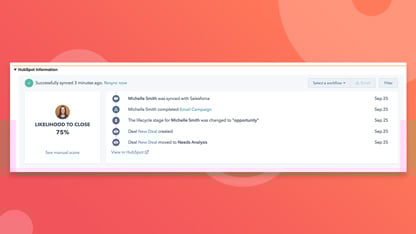
When something happens on the Salesforce side, it’s also mapped into HubSpot via the integration. This gives marketing the ability to nurture leads depending on where they fall in your sales cycle. It’s possible to set up automated enrollment in HubSpot lead nurturing workflows with triggers tied to specific sales interactions. Alternatively, your reps could enroll contacts in HubSpot workflows right from Salesforce. - Qualify Hot Sales Leads: Data from Salesforce and HubSpot alike can feed into custom lead scoring parameters set up by your partner. You can identify sales qualified leads or high-conversion opportunities, then let reps know about these priority contacts by sending lead scores from HubSpot to Salesforce.
- Export Content and Other Data: The base connector in the HubSpot-Salesforce integration is heavily focused on CRM-related records, assigned tasks, and contact behaviors. It won’t transfer all data, but a HubSpot integration partner can help you migrate other items as necessary. Perhaps you need a bridge to export historical proposals, content, templates, posts, or other assets into HubSpot. Lean on your partner to make a bridge that will work for your needs.
- Build a Central Analytics Hub: HubSpot is perfect for collecting all data on customers, deals, web traffic, asset conversions, and more into a central location that is smoothly integrated with your Salesforce CRM and all supplementary software. You’ll have a goldmine of analytics that a partner can help you monitor at a high level through visual data dashboards.
These are just a few of the ways that a HubSpot integration partner can help your sales team access valuable intelligence. Whether they prefer to work out of Salesforce or HubSpot, a professionally configured bi-directional integration will close the loop between marketing and sales.
Preparing for the HubSpot-Salesforce Integration
Step-by-Step Setup Guide
The HubSpot Salesforce integration does not have to be complicated. With careful planning and a methodical process, you can complete the integration with a limited number of issues and headaches.
Tidy Your Systems Up
The first step when integrating HubSpot with Salesforce is to go into each system and clean it up. Clear out duplicate data sets, make sure customer records are complete, and review any available technical logs and make adjustments as needed. This step is critical, and you should take the time you need to do it correctly.
As part of this process, you will want to make sure that anyone at the company who is using either system, directly or through an app that’s tied into one of the platforms, is aware of the integration. They may need to do the same type of data cleanup and preparation.
Granting Permissions
The two systems are set up to work independently of each other. If you want them to partner up, you have to give them permission to do that. (To do this, you will need to have an Administrator account in both systems.)
- In HubSpot, go to Settings > Connected Apps > Salesforce and select Connect App
- In Salesforce, grant the requested permissions for data sharing
You are now ready to really get started with your HubSpot integration with Salesforce.
Create the Integration User
The Salesforce integration with HubSpot starts and ends with HubSpot. The connection point between the two is known as the Integration User. With this profile, you can access anything you need to see or want to do in Salesforce through HubSpot.
One way to create the Integration User is to clone your Salesforce System Admin profile and then adjust the settings as needed.
Putting Data Where it Needs to Be
The first step you took when integrating HubSpot with Salesforce was a data review and cleanup. Now we’re going to take that data and “put it” where it needs to be.
Do you want Salesforce to have all of the same data as HubSpot? And do you want HubSpot to be able to access all of the data in Salesforce? The “right way” to share data between the two systems is, however, you need to do it for your specific business needs.
You may be wondering, “Why not just share all data between the two systems?” The answer could be a strategic one or a legal one. If you need to apply your record keeping to HIPPA laws, sharing personal information with marketing team members (which could include agency partners) could create a legal nightmare.
Field Mapping
This is a critical step to ensuring that all of the information in one part of Salesforce is going to the “right” part of HubSpot. And vice versa.
When you initiate the integration, there are a series of default mapping schemas that will be put into place. You can choose to change where those connection points are and the frequency with which they connect.
With all of the parameters set, data cleaned, and Integration User created, you are now ready to install the Salesforce HubSpot integration.
Common Challenges and How to Solve Them
While the outcome of this integration is overwhelmingly positive, the process can at times prove to be challenging. These are some of the potential issues you will need to account for:
Complicated Architectures - While the beauty of each platform is its’ power, that's also where its complexities lie. Tasks like mapping fields between the platforms and determining rules for syncing data can be cumbersome and complicated. If you don’t have a strong technical team well-experienced in system architecture, you might need to call in some help.
One Name, Two Meanings - Sometimes the littlest things can have the biggest implications. In the case of a HubSpot/Salesforce integration, names can cause a huge headache.
- HubSpot uses Contact Records for existing contacts and leads.
- Salesforce works in terms of leads, which are their own unique system entry. Existing contacts and records exist in the system as Contacts.
So we have two systems with a similar purpose, but with two very different ways of achieving it. You’ll need to create a very clear guide that you review with your entire team to ensure a process is in place so teams aren’t tripped up by naming differences.
Potentially Limited Customizations - Both HubSpot and Salesforce are extremely flexible but even they can’t account for some hyper-specific business needs. If you have a highly specialized business practice or utilize a complex workflow, it’s possible that you will need to develop some custom configurations.
Data Delays - Duplicate records and sync delays are just two of the concerns that could delay data to a point where workflows would be disrupted. Consistent monitoring and adjustments would be needed to overcome these issues, but that level of maintenance is often what companies are trying to move away from.
Cluttered Results - If the platforms were not “aligned” correctly or you didn’t start with a clean customer database, you could be sitting with corrupted data. This will provide you with no actionable insights or, worse yet, insights that are incorrect.
Missed Connections - One of the more frustrating things you may experience during the integration is when you open up one of the platforms and the connection with the other one is gone. Something could have timed out, or a setting may have shifted during an update. You’ll need to recheck all of your system settings, and you may even need to start sifting through server logs to find the issue.
Is HubSpot-Salesforce Integration Right for You?
Integrating HubSpot with Salesforce gives your company a powerful “new” tool. But is it the one you need?
To determine that, you’ll need to look at:
- Sales and marketing reports. Are they sometimes misaligned?
- The customer experience. Are prospects taking a smooth, linear journey through the sales process, or are there starts and fits along the way?
- Time spent managing systems. Does your team spend a good part of their day logging into one system to set up social posts, a CRM, an email service, a customer support tool, and analytics software?
If this is what your team is experiencing, then you should consider a HubSpot integration with Salesforce. When the two systems are integrated, you’ll have one location for all of your sales and marketing efforts. It’s a more efficient way to structure sales and run campaigns, and it enables you to provide a more effective and persuasive experience for customers and prospective customers.
If you’re concerned that you’re “not large” enough to need to pull the systems together now, it actually may be the optimal time to do so. That’s because it’s an integration that can scale with your company.
Ready To Get Started?
The HubSpot Solutions Directory is a perfect place to find and filter potential HubSpot integration partners until you locate a perfect match. The ideal partner will not only help you install the HubSpot-Salesforce integration, but become a strategic resource as well. There’s a deep well of sales intelligence waiting to supercharge your sales pipeline, and a HubSpot partner knows how to get you set up for success right out of the gate.